← Back to the post
1 / 12 Download PDF

Learn Azure · Part 1 · Basics

Your first Azure account

Subscriptions, resource groups and a safety net for your bill

VGViki Gandhi · vikigandhi.com/blog

1 / 12

By the end of this session

  • A free Azure account
  • A clear picture of how Azure organises everything
  • Your first resource group, named and tagged properly
  • A budget alert that emails you before your bill can surprise you

Nothing here costs money. Resource groups and budgets are free.

2 / 12

How Azure is organised

How Azure is organised A tenant contains subscriptions. A subscription contains resource groups. A resource group contains resources such as a web app, a database and a storage account. Tenant (Microsoft Entra ID) Who you are: users, groups, sign-in Subscription What you pay for and who can manage it Resource group · rg-learnazure-dev-eus Things that live and are deleted together Web app Resource Database Resource Storage account Resource
Each box sits inside exactly one box above it.

3 / 12

Four boxes, one inside the other

Tenant Your identity directory: users, groups, sign-ins The building
Subscription Billing and access boundary A floor with its own meter
Resource group Things that live and die together A room
Resource What you actually pay for The furniture

4 / 12

Two rules to remember

  • Every resource belongs to exactly one resource group, and every resource group to one subscription
  • Deleting a resource group deletes everything in it, which makes clean-up easy

5 / 12

Free account or pay as you go
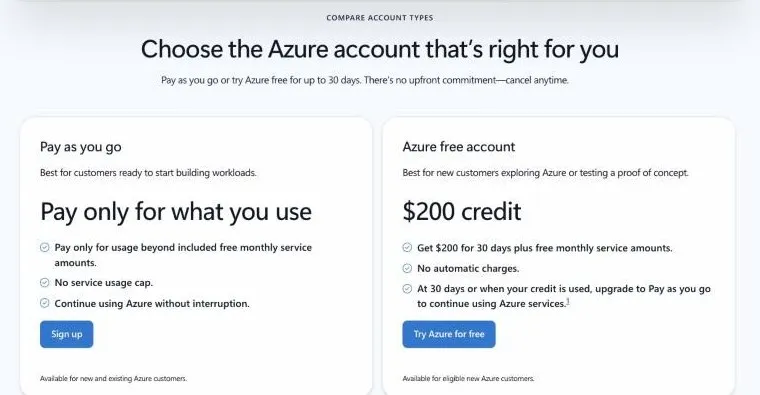
  • Free: $200 credit for 30 days plus free monthly amounts
  • Needs a Microsoft account, phone and card ($1 temporary hold)
  • Nothing is billed until you choose to upgrade

6 / 12

Create your first resource group
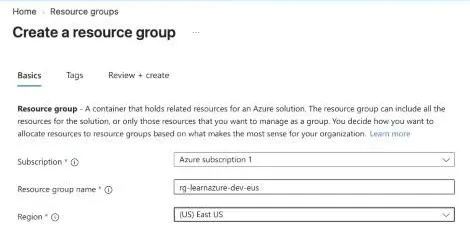
  • Name pattern: rg-<workload>-<env>-<region>
  • rg-learnazure-dev-eus
  • Region stores the group's metadata, not its resources

7 / 12

Tag it from day one
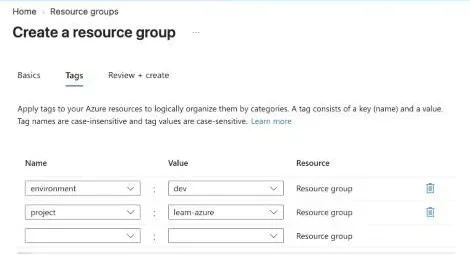
  • environment = dev
  • project = learn-azure
  • Filter and group costs by tag later

8 / 12

Set a budget alert
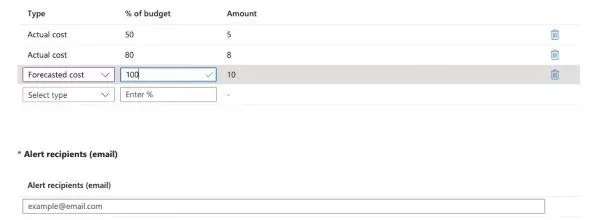
  • $10 a month
  • Email at 50% and 80% of actual spend
  • Email when the forecast reaches 100%

9 / 12

Remember

A budget does not stop spending

It only sends alerts. Treat the email as a signal to open Cost analysis and delete what you forgot. Cost data can take up to a day to appear.

10 / 12

Quick check

  • Delete a resource group with a web app and a database inside. What happens?
  • Can a resource group in East US hold a database in West Europe?
  • Does a $10 budget stop Azure at $10?
  • Which alert warns you earlier: actual 80% or forecast 100%?

Answers are in the post.

11 / 12

Up next

Next: deploy a web app with App Service

Put a real web page on the internet, in the resource group you just created, on the free tier.

vikigandhi.com/blog · Learn Azure

12 / 12